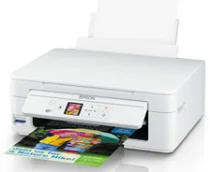
Epson Expression Home Software e driver per la stampante XP-344 Windows e macOS.
Sistemi operativi Microsoft Windows supportati
Windows 11
Windows 10 (32/64-bit)
Windows 8.1 (32/64-bit)
Windows 8 (32/64-bit)
Windows 7 (32 /64-bit)
Windows Vista (32 /64-bit)
Windows XP SP2 (32/64-bit)
Sistemi operativi supportati: Windows 10 32-bit, Windows 8.1 32-bit, Windows 8 32-bit, Windows 7 32-bit, Windows Vista 32-bit, Windows XP 32-bit
Sistemi operativi supportati: Windows 11, Windows 10 64-bit, Windows 8.1 64-bit, Windows 8 64-bit, Windows 7 64-bit, Windows Vista 64-bit, Windows XP 64-bit
Sistemi operativi supportati: Windows 11, Windows 10 32-bit and 64-bit, Windows 8.1 32-bit and 64-bit, Windows 8 32-bit and 64-bit, Windows 7 32-bit and 64-bit, Windows Vista 32-bit and 64-bit, Windows XP 32-bit and 64-bit
Sistemi operativi supportati: Windows 10 32-bit, Windows 8.1 32-bit, Windows 8 32-bit, Windows 7 32-bit, Windows Vista 32-bit, Windows XP 32-bit
Sistemi operativi supportati: Windows 11, Windows 10 64-bit, Windows 8.1 64-bit, Windows 8 64-bit, Windows 7 64-bit, Windows Vista 64-bit, Windows XP 64-bit
Sistemi operativi supportati: Windows 11, Windows 10 32-bit and 64-bit, Windows 8.1 32-bit and 64-bit, Windows 8 32-bit and 64-bit, Windows 7 32-bit and 64-bit, Windows Vista 32-bit and 64-bit, Windows XP 32-bit and 64-bit
Sistemi operativi macOS supportati
macOS Ventura 13
macOS Monterey 12
macOS Big Sur 11
macOS Catalina 10.15
macOS Mojave 10.14
macOS High Sierra 10.13
macOS Sierra 10.12
OS X El Capitan 10.11
OS X Yosemite 10.10
OS X Mavericks 10.9
OS X Mountain Lion 10.8
Mac OS X Lion 10.7
Mac OS X Snow Leopard 10.6
Sistemi operativi supportati: Mac OS X Snow Leopard 10.6, Mac OS X Lion 10.7, OS X Mountain Lion 10.8, OS X Mavericks 10.9, OS X Yosemite 10.10, OS X El Capitan 10.11, macOS Sierra 10.12, macOS High Sierra 10.13, macOS Mojave 10.14, macOS Catalina 10.15, macOS Big Sur 11, macOS Monterey 12, macOS Ventura 13
Sistemi operativi supportati: Mac OS X Snow Leopard 10.6, Mac OS X Lion 10.7, OS X Mountain Lion 10.8, OS X Mavericks 10.9, OS X Yosemite 10.10, OS X El Capitan 10.11, macOS Sierra 10.12, macOS High Sierra 10.13, macOS Mojave 10.14, macOS Catalina 10.15, macOS Big Sur 11, macOS Monterey 12, macOS Ventura 13
Epson Expression Home Specifiche XP-344
Migliori Epson Expression Home La stampante XP-344 è una soluzione ideale per chi cerca versatilità ed efficienza. Questo dispositivo multifunzione è interessante perché, grazie alle sue dimensioni compatte, non necessita di spazi separati per stampare, scansionare e copiare. Questa caratteristica è fondamentale per questo modello. Inoltre, la sua originalità risiede nella connettività Wi-Fi, che ne amplia le funzionalità consentendo di stampare documenti e foto direttamente da smartphone e tablet.
Un altro vantaggio essenziale è la facilità d'uso, ottenuta grazie ad un'installazione semplice e ad un'interfaccia comprensibile, che può essere utilizzata anche da chi è lontano dalle nuove tecnologie. La stampa potrebbe essere più veloce, soprattutto utilizzando carta colorata. Quest'ultimo ha bisogno di più tempo per soddisfare le esigenze di quegli utenti che mirano ad aumentare la frequenza di carte e documenti stampati. Inoltre la tipografia richiede una somma considerevole per la sostituzione dell'inchiostro, che non può essere costosa per la categoria di clienti individuata.
Tuttavia, la stampa, in particolare le foto, merita un grande elogio a causa dei colori brillanti e trasparenti e delle leggere differenze tra gli oggetti stampati. È un vantaggio essenziale per i fotografi amatoriali e per coloro che mirano a stampare rapidamente diversi documenti. Analizzando le conclusioni della stampante XP-344, è possibile concludere che questo prodotto è abbastanza ragionevole rispetto alle alternative della stessa categoria. La sua stampa fotografica soddisferà le esigenze di tutti gli utenti.