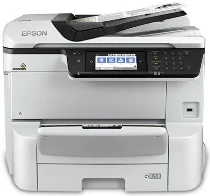
Epson WorkForce Pro Software e driver per la stampante WF-C8690 Windows e macOS.
Sistemi operativi Microsoft Windows supportati
Windows 11
Windows 10 (32/64-bit)
Windows 8.1 (32/64-bit)
Windows 8 (32/64-bit)
Windows 7 (32 /64-bit)
Windows Vista (32 /64-bit)
Windows XP (32/64-bit)
Sistemi operativi supportati: Windows 11, Windows 10 32-bit e 64-bit, Windows 8.1 32-bit e 64-bit, Windows 8 32-bit e 64-bit, Windows 7 32-bit e 64-bit, Windows Vista 32-bit e 64-bit
Il programma di installazione del pacchetto driver contiene i seguenti elementi:
- Driver della stampante
- Driver dello scanner e Epson Scan 2 Utilità
- Document Capture Pro
- Utilità Epson FAX
- Epson Scan 2 Componente OCR
- Aggiornamento software Epson
Sistemi operativi supportati: Windows XP 32-bit and 64-bit
Il programma di installazione del pacchetto driver contiene i seguenti elementi:
- Driver della stampante
- Driver dello scanner e Epson Scan 2 Utilità
- Document Capture Pro
- Utilità Epson FAX
- Epson Scan 2 Componente OCR
- Aggiornamento software Epson
Sistemi operativi supportati: Windows 10 32-bit, Windows 8.1 32-bit, Windows 8 32-bit, Windows 7 32-bit, Windows Vista 32-bit, Windows XP 32-bit
Sistemi operativi supportati: Windows 11, Windows 10 64-bit, Windows 8.1 64-bit, Windows 8 64-bit, Windows 7 64-bit, Windows Vista 64-bit, Windows XP 64-bit
Sistemi operativi supportati: Windows 10 32-bit, Windows 8.1 32-bit, Windows 8 32-bit, Windows 7 32-bit, Windows Vista 32-bit, Windows XP 32-bit
Sistemi operativi supportati: Windows 11, Windows 10 64-bit, Windows 8.1 64-bit, Windows 8 64-bit, Windows 7 64-bit, Windows Vista 64-bit, Windows XP 64-bit
Sistemi operativi supportati: Windows 11, Windows 10 32-bit and 64-bit, Windows 8.1 32-bit and 64-bit, Windows 8 32-bit and 64-bit, Windows 7 32-bit and 64-bit, Windows Vista 32-bit and 64-bit, Windows XP 32-bit and 64-bit
Sistemi operativi supportati: Windows 10 32-bit, Windows 8.1 32-bit, Windows 8 32-bit, Windows 7 32-bit, Windows Vista 32-bit, Windows XP 32-bit
Sistemi operativi supportati: Windows 11, Windows 10 64-bit, Windows 8.1 64-bit, Windows 8 64-bit, Windows 7 64-bit, Windows Vista 64-bit, Windows XP 64-bit
Sistemi operativi supportati: Windows 11, Windows 10 64-bit, Windows 8.1 64-bit, Windows 8 64-bit, Windows 7 64-bit, Windows Vista 64-bit, Windows XP 64-bit
Sistemi operativi supportati: Windows 10 32-bit, Windows 8.1 32-bit, Windows 8 32-bit, Windows 7 32-bit, Windows Vista 32-bit, Windows XP 32-bit
Sistemi operativi supportati: Windows 11, Windows 10 64-bit, Windows 8.1 64-bit, Windows 8 64-bit, Windows 7 64-bit, Windows Vista 64-bit, Windows XP 64-bit
Sistemi operativi supportati: Windows 10 32-bit, Windows 8.1 32-bit, Windows 8 32-bit, Windows 7 32-bit, Windows Vista 32-bit, Windows XP 32-bit
Sistemi operativi supportati: Windows 10 64-bit, Windows 8.1 64-bit, Windows 8 64-bit, Windows 7 64-bit, Windows Vista 64-bit, Windows XP 64-bit
Sistemi operativi supportati: Windows 10 32-bit, Windows 8.1 32-bit, Windows 8 32-bit, Windows 7 32-bit, Windows Vista 32-bit, Windows XP 32-bit
Sistemi operativi supportati: Windows 10 64-bit, Windows 8.1 64-bit, Windows 8 64-bit, Windows 7 64-bit, Windows Vista 64-bit, Windows XP 64-bit
Sistemi operativi macOS supportati
macOS Ventura 13
macOS Monterey 12
macOS Big Sur 11
macOS Catalina 10.15
macOS Mojave 10.14
macOS High Sierra 10.13
macOS Sierra 10.12
OS X El Capitan 10.11
OS X Yosemite 10.10
OS X Mavericks 10.9
OS X Mountain Lion 10.8
Mac OS X Lion 10.7
Mac OS X Snow Leopard 10.6
Sistemi operativi supportati: macOS Catalina 10.15, macOS Big Sur 11, macOS Monterey 12, macOS Ventura 13
Il programma di installazione del pacchetto driver contiene i seguenti elementi:
- Driver della stampante
- Driver dello scanner e Epson Scan 2 Utilità
- Cattura del documento
- Utilità Epson FAX
- Aggiornamento software Epson
Sistemi operativi supportati: Mac OS X Lion 10.7, OS X Mountain Lion 10.8, OS X Mavericks 10.9, OS X Yosemite 10.10, OS X El Capitan 10.11, macOS Sierra 10.12, macOS High Sierra 10.13, macOS Mojave 10.14
Il programma di installazione del pacchetto driver contiene i seguenti elementi:
- Driver della stampante
- Driver dello scanner e Epson Scan 2 Utilità
- Cattura del documento
- Utilità Epson FAX
- Aggiornamento software Epson
Sistemi operativi supportati: Mac OS X Snow Leopard 10.6, Mac OS X Lion 10.7, OS X Mountain Lion 10.8, OS X Mavericks 10.9, OS X Yosemite 10.10, OS X El Capitan 10.11, macOS Sierra 10.12, macOS High Sierra 10.13, macOS Mojave 10.14, macOS Catalina 10.15, macOS Big Sur 11, macOS Monterey 12, macOS Ventura 13
Sistemi operativi supportati: Mac OS X Snow Leopard 10.6, Mac OS X Lion 10.7, OS X Mountain Lion 10.8, OS X Mavericks 10.9, OS X Yosemite 10.10, OS X El Capitan 10.11, macOS Sierra 10.12, macOS High Sierra 10.13, macOS Mojave 10.14, macOS Catalina 10.15, macOS Big Sur 11, macOS Monterey 12, macOS Ventura 13
Sistemi operativi supportati: Mac OS X Snow Leopard 10.6, Mac OS X Lion 10.7, OS X Mountain Lion 10.8, OS X Mavericks 10.9, OS X Yosemite 10.10, OS X El Capitan 10.11, macOS Sierra 10.12, macOS High Sierra 10.13, macOS Mojave 10.14, macOS Catalina 10.15, macOS Big Sur 11, macOS Monterey 12, macOS Ventura 13
Sistemi operativi supportati: Mac OS X Snow Leopard 10.6, Mac OS X Lion 10.7, OS X Mountain Lion 10.8, OS X Mavericks 10.9, OS X Yosemite 10.10, OS X El Capitan 10.11, macOS Sierra 10.12, macOS High Sierra 10.13, macOS Mojave 10.14, macOS Catalina 10.15, macOS Big Sur 11, macOS Monterey 12
Epson WorkForce Pro Specifiche del modello WF-C8690
Se hai bisogno di stampe ad alto volume giornaliere, Epson WorkForce Pro La multifunzione WF-C8690 A3 è una soluzione completa. Gestisce stampe fino al formato A3 da 13 x 19 pollici ed è ideale per la produzione di fogli di calcolo e grafici di grandi dimensioni dall'aspetto professionale. Inoltre, la tecnologia PrecisionCore consente alla stampante di produrre stampe nitide come la seta, garantendo al contempo una velocità di copia sufficiente a soddisfare le esigenze degli ambienti di lavoro più esigenti di oggi.
Il WF-C8690 è progettato per la facilità d'uso. Ha un grande pannello touch screen utilizzato sui telefoni cellulari e puoi configurarlo rapidamente con un'eccellente interfaccia utente. Completa il tutto con funzionalità come la stampa fronte-retro automatica, la scansione, la copia e l'invio di fax, che possono aumentare significativamente la produttività in ufficio. Inoltre, con la sua capacità massima di 1,830 fogli, la stampante ha meno bisogno di essere ricaricata. Le sue opzioni di connettività, tra cui Wi-Fi Direct, NFC ed Ethernet, ne migliorano ulteriormente la flessibilità, consentendo un'integrazione perfetta nella maggior parte delle configurazioni sul posto di lavoro.
Per quanto riguarda il rapporto costo-efficacia, Epson si distingue dalle laser a colori più costose per un costo per pagina inferiore, rendendo questo modello ancora più economico per la stampa a colori. Inoltre, le cartucce a lunga durata e ad alto rendimento consentono di consumare parecchie pagine prima che sia necessaria una sostituzione. Riduce al minimo la necessità di manutenzione e i periodi di inattività tra i lavori di stampa. Pertanto, gli uffici che desiderano ridurre le spese per pagina pur richiedendo qualità ed efficienza possono trovare una soluzione nel WF-C8690. Tali aziende possono trarre vantaggio dalle loro capacità multifunzionali A3 soppesando i costi.