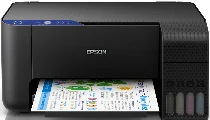
Epson EcoTank L3111: software e driver per Windows e macOS.
Sistemi operativi Microsoft Windows supportati
Windows 10 (32-bit e 64-bit)
Windows 8.1 (32-bit e 64-bit)
Windows 8 (32-bit e 64-bit)
Windows 7 (32-bit e 64-bit)
Windows Vista (32-bit e 64-bit)
Windows XP SP2 (32-bit e 64-bit)
Sistemi operativi supportati: Windows 10 32-bit, Windows 8.1 32-bit, Windows 8 32-bit, Windows 7 32-bit, Windows Vista 32-bit, Windows XP 32-bit
Sistemi operativi supportati: Windows 10 64-bit, Windows 8.1 64-bit, Windows 8 64-bit, Windows 7 64-bit, Windows Vista 64-bit, Windows XP 64-bit
Sistemi operativi supportati: Windows 10 32-bit e 64-bit, Windows 8.1 32-bit e 64-bit, Windows 8 32-bit e 64-bit, Windows 7 32-bit e 64-bit, Windows Vista 32-bit e 64-bit, Windows XP 32-bit e 64-bit
Sistemi operativi supportati: Windows 10 32-bit e 64-bit, Windows 8.1 32-bit e 64-bit, Windows 8 32-bit e 64-bit, Windows 7 32-bit e 64-bit, Windows Vista 32-bit e 64-bit, Windows XP 32-bit e 64-bit
Sistemi operativi macOS supportati
macOS Mojave 10.14
macOS High Sierra 10.13
macOS Sierra 10.12
OS X El Capitan 10.11
OS X Yosemite 10.10
OS X Mavericks 10.9
OS X Mountain Lion 10.8
Mac OS X Lion 10.7
Mac OS X Snow Leopard 10.6
Mac OS X Leopard 10.5
Sistemi operativi supportati: Mac OS X Leopard 10.5, Mac OS X Snow Leopard 10.6, Mac OS X Lion 10.7, OS X Mountain Lion 10.8, OS X Mavericks 10.9, OS X Yosemite 10.10, OS X El Capitan 10.11, macOS Sierra 10.12, macOS High Sierra 10.13, macOS Mojave 10.14
Sistemi operativi supportati: Mac OS X Leopard 10.5, Mac OS X Snow Leopard 10.6, Mac OS X Lion 10.7, OS X Mountain Lion 10.8, OS X Mavericks 10.9, OS X Yosemite 10.10, OS X El Capitan 10.11, macOS Sierra 10.12, macOS High Sierra 10.13, macOS Mojave 10.14
Specifiche di Epson EcoTank L3111
Tra i numerosi modelli dell’ampia gamma di stampanti Epson, l’EcoTank L3111 si distingue in un mercato saturo. Le stampanti hanno usi diversi, quindi la scelta del modello più adatto dipende soprattutto dalle esigenze specifiche di chi lo acquista. Una delle caratteristiche più interessanti è il sistema a serbatoi d’inchiostro, anziché le normali cartucce, che riduce i costi e gli sprechi. Questa stampante è pensata per gli studenti dell’ultimo anno delle scuole superiori e per gli universitari, che hanno molto da fare e spesso devono stampare. La configurazione dell’EcoTank L3111 è semplice.
La stampante è adeguata per stampare documenti e, occasionalmente, foto. La velocità di stampa è accettabile e consente di stampare compiti e progetti senza rallentare, oltre alle foto ogni tanto.
Poiché la stampante non supporta la stampa wireless da smartphone o tablet, la connessione USB garantisce un collegamento stabile al PC. Una caratteristica particolarmente interessante è la possibilità di utilizzare un’ampia varietà di carta riciclata A4 e di altri tipi e formati simili. Ciò che la distingue maggiormente dalle altre stampanti della stessa categoria sono i minori costi e sprechi. Anche se il prezzo iniziale può essere inferiore per altre stampanti, questa caratteristica riduce i costi per pagina. Grazie alla facilità d’uso e ai costi di gestione contenuti, Epson EcoTank L3111 è una delle migliori stampanti da acquistare.