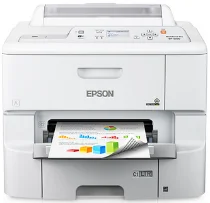
Epson WorkForce Pro WF-6090: software e driver per Windows e macOS.
Sistemi operativi Microsoft Windows supportati
Windows 11
Windows 10 (32-bit e 64-bit)
Windows 8.1 (32-bit e 64-bit)
Windows 8 (32-bit e 64-bit)
Windows 7 (32-bit e 64-bit)
Windows Vista (32-bit e 64-bit)
Windows XP (32-bit e 64-bit)
Sistemi operativi supportati: Windows 11, Windows 10 32-bit e 64-bit, Windows 8.1 32-bit e 64-bit, Windows 8 32-bit e 64-bit, Windows 7 32-bit e 64-bit, Windows Vista 32-bit e 64-bit
Questo programma di installazione del pacchetto driver include i seguenti elementi:
- Driver stampante
- Epson Software Updater
Sistemi operativi supportati: Windows XP 32-bit e 64-bit
Questo programma di installazione del pacchetto driver include i seguenti elementi:
- Driver stampante
- Epson Software Updater
Sistemi operativi supportati: Windows 10 32-bit, Windows 8.1 32-bit, Windows 8 32-bit, Windows 7 32-bit, Windows Vista 32-bit, Windows XP 32-bit
Sistemi operativi supportati: Windows 11, Windows 10 64-bit, Windows 8.1 64-bit, Windows 8 64-bit, Windows 7 64-bit, Windows Vista 64-bit, Windows XP 64-bit
Sistemi operativi supportati: Windows 10 32-bit, Windows 8.1 32-bit, Windows 8 32-bit, Windows 7 32-bit, Windows Vista 32-bit, Windows XP 32-bit
Sistemi operativi supportati: Windows 11, Windows 10 64-bit, Windows 8.1 64-bit, Windows 8 64-bit, Windows 7 64-bit, Windows Vista 64-bit, Windows XP 64-bit
Sistemi operativi supportati: Windows 10 32-bit, Windows 8.1 32-bit, Windows 8 32-bit, Windows 7 32-bit, Windows Vista 32-bit, Windows XP 32-bit
Sistemi operativi supportati: Windows 11, Windows 10 64-bit, Windows 8.1 64-bit, Windows 8 64-bit, Windows 7 64-bit, Windows Vista 64-bit, Windows XP 64-bit
Sistemi operativi supportati: Windows 11, Windows 10 64-bit, Windows 8.1 64-bit, Windows 8 64-bit, Windows 7 64-bit, Windows Vista 64-bit, Windows XP 64-bit
Sistemi operativi supportati: Windows 10 32-bit, Windows 8.1 32-bit, Windows 8 32-bit, Windows 7 32-bit, Windows Vista 32-bit, Windows XP 32-bit
Sistemi operativi supportati: Windows 10 64-bit, Windows 8.1 64-bit, Windows 8 64-bit, Windows 7 64-bit, Windows Vista 64-bit, Windows XP 64-bit
Sistemi operativi macOS supportati
macOS Ventura 13
macOS Monterey 12
macOS Big Sur 11
macOS Catalina 10.15
macOS Mojave 10.14
macOS High Sierra 10.13
macOS Sierra 10.12
OS X El Capitan 10.11
OS X Yosemite 10.10
OS X Mavericks 10.9
OS X Mountain Lion 10.8
Mac OS X Lion 10.7
Mac OS X Snow Leopard 10.6
Mac OS X Leopard 10.5
Sistemi operativi supportati: macOS Catalina 10.15, macOS Big Sur 11, macOS Monterey 12, macOS Ventura 13
Questo programma di installazione del pacchetto driver include i seguenti elementi:
- Driver stampante
- Epson Software Updater
Sistemi operativi supportati: Mac OS X Lion 10.7, OS X Mountain Lion 10.8, OS X Mavericks 10.9, OS X Yosemite 10.10, OS X El Capitan 10.11, macOS Sierra 10.12, macOS High Sierra 10.13, macOS Mojave 10.14
Questo programma di installazione del pacchetto driver include i seguenti elementi:
- Driver stampante
- Epson Software Updater
Sistemi operativi supportati: Mac OS X Snow Leopard 10.6, Mac OS X Lion 10.7, OS X Mountain Lion 10.8, OS X Mavericks 10.9, OS X Yosemite 10.10, OS X El Capitan 10.11, macOS Sierra 10.12, macOS High Sierra 10.13, macOS Mojave 10.14, macOS Catalina 10.15, macOS Big Sur 11, macOS Monterey 12, macOS Ventura 13
Sistemi operativi supportati: Mac OS X Snow Leopard 10.6, Mac OS X Lion 10.7, OS X Mountain Lion 10.8, OS X Mavericks 10.9, OS X Yosemite 10.10, OS X El Capitan 10.11, macOS Sierra 10.12, macOS High Sierra 10.13, macOS Mojave 10.14, macOS Catalina 10.15, macOS Big Sur 11, macOS Monterey 12, macOS Ventura 13
Sistemi operativi supportati: Mac OS X Snow Leopard 10.6, Mac OS X Lion 10.7, OS X Mountain Lion 10.8, OS X Mavericks 10.9, OS X Yosemite 10.10, OS X El Capitan 10.11, macOS Sierra 10.12, macOS High Sierra 10.13, macOS Mojave 10.14, macOS Catalina 10.15, macOS Big Sur 11, macOS Monterey 12
Specifiche di Epson WorkForce Pro WF-6090
Le prestazioni elevate e l’ottimo rapporto costo-efficacia hanno reso la stampante Epson WorkForce Pro WF-6090 un prodotto di spicco nel mercato delle stampanti per ufficio. È progettata per ambienti di lavoro dai ritmi intensi e punta sulla stampa ad alta velocità e ad alto volume. È veloce e ha un ciclo di lavoro mensile elevato, pari a 75,000 pagine, che gestisce senza difficoltà. Inoltre, le cartucce ad alta capacità richiedono meno sostituzioni e consentono di stampare di più con ciascuna cartuccia. Stampa fino a 10000 pagine con l’inchiostro nero e 7000 pagine prima di dover sostituire le cartucce a colori.
Uno dei principali vantaggi di questa stampante è il risparmio sui costi. Qualsiasi azienda apprezza la possibilità di ridurre le spese. La manutenzione di questa stampante monocromatica può anche costare molto meno. La WF-6090 consuma fino all’80% di energia in meno rispetto alle stampanti laser a colori. Nel lungo periodo, questo può tradursi in un notevole risparmio sulla bolletta elettrica. Per esempio, la stampa automatica fronte/retro consente di risparmiare risorse e ridurre i costi della carta. La WF-6090 è efficiente dal punto di vista energetico e tiene conto anche degli standard ambientali.
La WF-6090 offre numerose opzioni di connettività, sia cablate sia wireless, tra cui Wi-Fi Direct e NFC. La sua versatilità le permette di integrarsi facilmente in diversi ambienti di lavoro. È imbattibile nella stampa di documenti, ma non è una stampante multifunzione: è progettata esclusivamente per i documenti. Tuttavia, per le istituzioni che producono soprattutto documenti di testo con qualche elemento grafico, la WF-6090 unisce produttività ed economicità, ed è una scelta valida per chi cerca una stampante affidabile e conveniente. La combinazione di velocità, durata e bassi costi di gestione rende la WF-6090 un ottimo investimento per le aziende con vincoli di prestazioni e di budget limitato.